UI Engineering: Building Modern Interface Systems
The discipline of ui engineering sits at the critical intersection of design and development, transforming visual concepts into functional, performant interfaces. As products become increasingly complex, the role of ui engineering extends far beyond implementing mockups-it encompasses architecture decisions, performance optimization, accessibility compliance, and creating reusable systems that scale with business needs. For companies building payment rails, dashboards, gaming platforms, or AI-powered tools, mastering ui engineering fundamentals determines whether users embrace or abandon your product.
The Foundation of Modern UI Engineering
UI engineering requires a comprehensive understanding of how users interact with digital products and how code translates design intent into reality. This discipline combines technical proficiency with user-centered thinking, demanding expertise in multiple areas simultaneously.
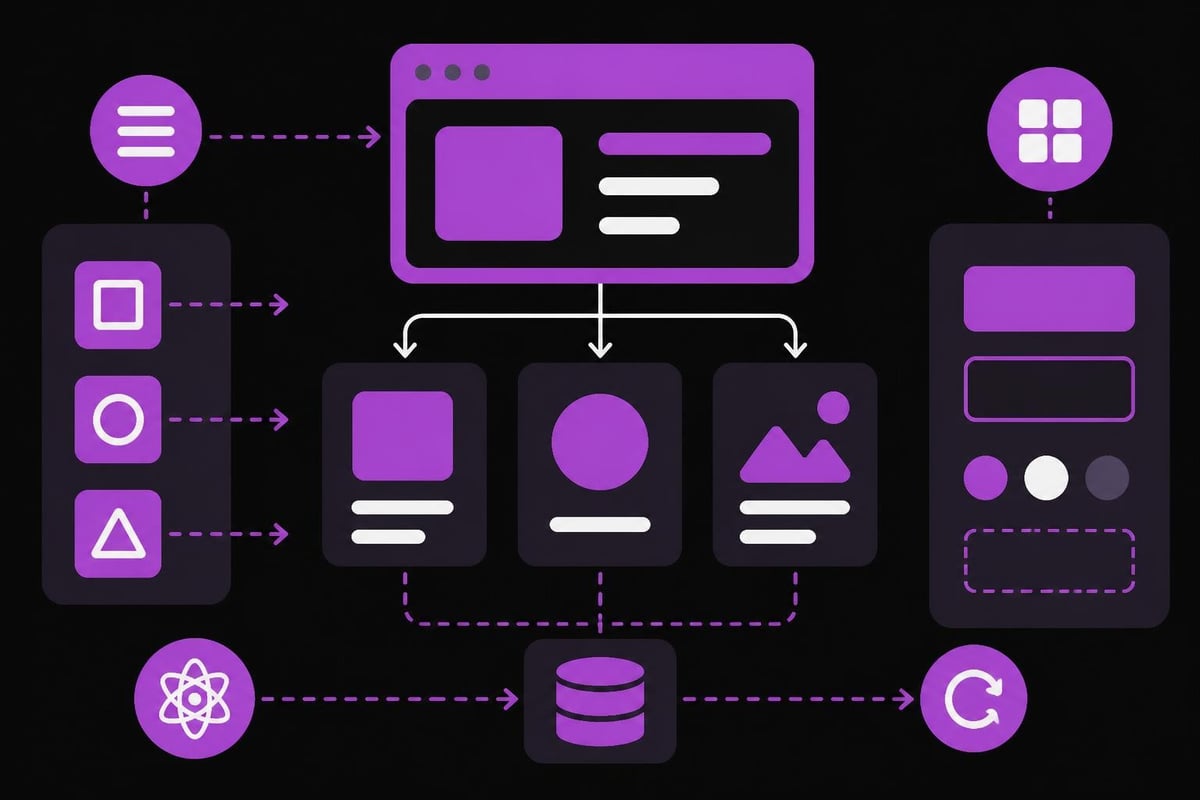
The modern ui engineering landscape encompasses several core competencies. Component architecture forms the foundation, requiring engineers to break interfaces into modular, reusable pieces that maintain consistency across applications. State management becomes increasingly critical as applications grow, determining how data flows through interfaces and updates in response to user actions. Performance optimization ensures interfaces remain responsive even as feature sets expand, while accessibility guarantees products remain usable for everyone regardless of ability.
Technical Stack Considerations
Different projects demand different technological approaches. When building web applications, the choice between React, Vue, Svelte, or other frameworks significantly impacts development velocity and long-term maintainability.
| Framework | Best For | Key Advantage | Learning Curve |
|---|---|---|---|
| React | Complex applications | Ecosystem size | Moderate |
| Vue | Rapid prototyping | Approachability | Low |
| Svelte | Performance-critical | Compilation speed | Low-Moderate |
| Angular | Enterprise systems | Complete solution | High |
Beyond frameworks, ui engineering involves mastering CSS methodologies, understanding browser rendering pipelines, and implementing responsive design patterns that adapt seamlessly across devices. The technical stack you choose should align with project requirements, team expertise, and long-term scalability needs.
Building Scalable Component Systems
Successful ui engineering at scale requires systematic approaches to component development. Rather than building isolated interface elements, engineers must create cohesive systems where components work together harmoniously.
Design systems serve as the backbone of scalable ui engineering. These comprehensive libraries document every interface pattern, from button variants to complex form interactions. When properly implemented, design systems reduce development time, maintain visual consistency, and enable teams to move faster without sacrificing quality.
Creating effective component systems involves several critical practices:
- Single Responsibility Principle: Each component should handle one specific task
- Composition over Inheritance: Build complex interfaces by combining simple components
- Props Validation: Enforce type safety to catch errors during development
- Comprehensive Documentation: Include usage examples, props descriptions, and visual variations
- Version Control: Track component changes to prevent breaking updates
State Management Patterns
Managing application state represents one of ui engineering's most challenging aspects. Poor state management leads to bugs, performance issues, and maintenance nightmares. Modern applications require deliberate architectural decisions about where state lives and how it flows through the component tree.
Local component state works perfectly for isolated interactions-toggles, form inputs, or temporary UI changes. When multiple components need access to shared data, lifting state up to common ancestors maintains single sources of truth. For complex applications, dedicated state management libraries like Redux, MobX, or Zustand provide structured approaches to global state.
The key is matching state management complexity to actual needs. A simple dashboard doesn't require Redux's overhead, while a multi-user collaboration platform benefits from centralized state architecture. Following UI design principles helps inform these architectural decisions.
Performance Optimization in UI Engineering
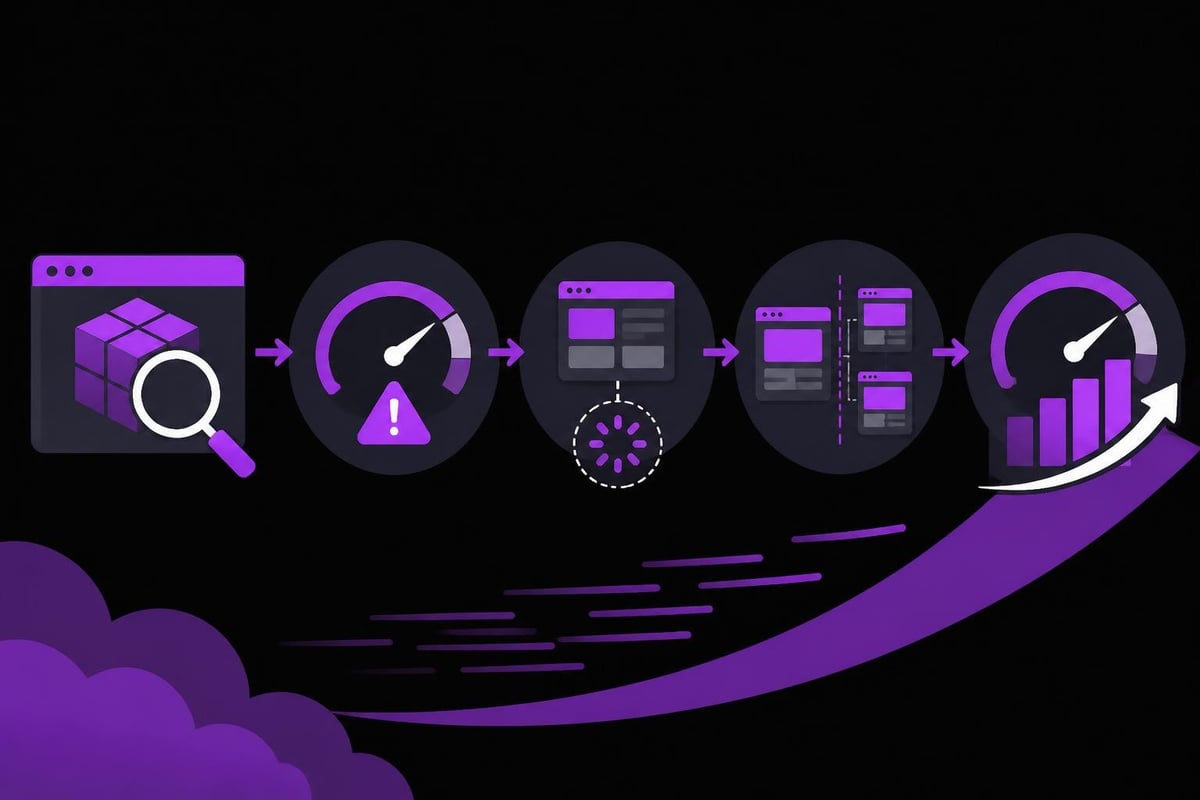
Users expect instant responses from modern interfaces. Every millisecond of delay increases abandonment rates, making performance optimization non-negotiable in professional ui engineering. The difference between acceptable and exceptional interfaces often comes down to meticulous performance work.
Rendering Optimization Techniques
Understanding how browsers render content unlocks powerful optimization strategies. The critical rendering path-from HTML parsing through paint and composite-determines initial load performance. Optimizing this path requires strategic resource loading, minimizing render-blocking resources, and prioritizing above-the-fold content.
Code splitting divides applications into smaller bundles loaded on demand, dramatically reducing initial load times. Instead of downloading an entire application upfront, users receive only the code needed for their current view. Route-based splitting provides an excellent starting point, with component-level splitting available for additional optimization.
Lazy loading extends this concept to images, videos, and other media. By deferring non-critical resource loading until needed, interfaces become interactive faster. Modern browser APIs like Intersection Observer make implementing lazy loading straightforward without external dependencies.
- Implement virtual scrolling for long lists
- Use memoization to prevent unnecessary re-renders
- Optimize images with appropriate formats and sizes
- Minimize JavaScript bundle sizes through tree shaking
- Leverage browser caching strategically
| Optimization Technique | Performance Impact | Implementation Difficulty |
|---|---|---|
| Code Splitting | High | Moderate |
| Image Optimization | High | Low |
| Virtual Scrolling | Very High | Moderate-High |
| Lazy Loading | Moderate-High | Low |
| Service Workers | Moderate | High |
Accessibility as Engineering Practice
Accessibility isn't an optional feature-it's a fundamental requirement of competent ui engineering. Building accessible interfaces ensures products reach the widest possible audience while often improving usability for everyone. When developing product designs, accessibility considerations should inform every decision from initial architecture through final implementation.
Semantic HTML provides the foundation for accessible interfaces. Using proper heading hierarchies, landmark regions, and form associations enables assistive technologies to understand content structure. While div-soup might render visually identical, it creates impenetrable barriers for screen reader users.
Keyboard Navigation and Focus Management
Every interface element users can click must also be keyboard accessible. This includes custom components like dropdowns, modals, and carousels. The dos and don'ts for successful UI engineering emphasize keyboard accessibility as non-negotiable.
Focus management becomes particularly critical in dynamic interfaces. When opening modals, focus should move to the modal content. When closing them, focus should return to the triggering element. These seemingly small details dramatically impact usability for keyboard-only users.
ARIA attributes supplement semantic HTML where native elements fall short. However, the first rule of ARIA is to avoid using it when semantic HTML suffices. Overuse creates confusion rather than clarity. When ARIA is necessary, proper implementation requires understanding roles, states, and properties thoroughly.
Responsive Design Implementation
Modern ui engineering demands interfaces that adapt gracefully across infinite device variations. Responsive design extends beyond simple breakpoint adjustments-it requires fundamentally rethinking how content, interaction patterns, and visual hierarchies work across contexts.
Mobile-first development provides a robust foundation for responsive interfaces. Starting with constrained mobile layouts forces prioritization of essential content and functionality. Progressive enhancement then adds capabilities for larger screens, rather than attempting to strip features from desktop designs.
The technical implementation of responsive design involves several coordinated approaches:
- Fluid grids using relative units instead of fixed pixels
- Flexible images that scale within their containers
- Media queries applying styles based on device characteristics
- Responsive typography scaling text appropriately across viewports
- Touch-friendly targets ensuring interactive elements remain usable on small screens
Container Queries and Modern Layout
Container queries represent a significant evolution in responsive ui engineering. Rather than responding to viewport dimensions, components adapt based on their container size. This enables truly modular components that work correctly regardless of where they're placed.
CSS Grid and Flexbox provide powerful layout primitives that reduce reliance on frameworks. Understanding when to use each system-Grid for two-dimensional layouts, Flexbox for one-dimensional arrangements-elevates interface implementation quality. The UI design best practices outlined by industry leaders emphasize mastering modern CSS capabilities.
Testing Strategies for UI Engineering
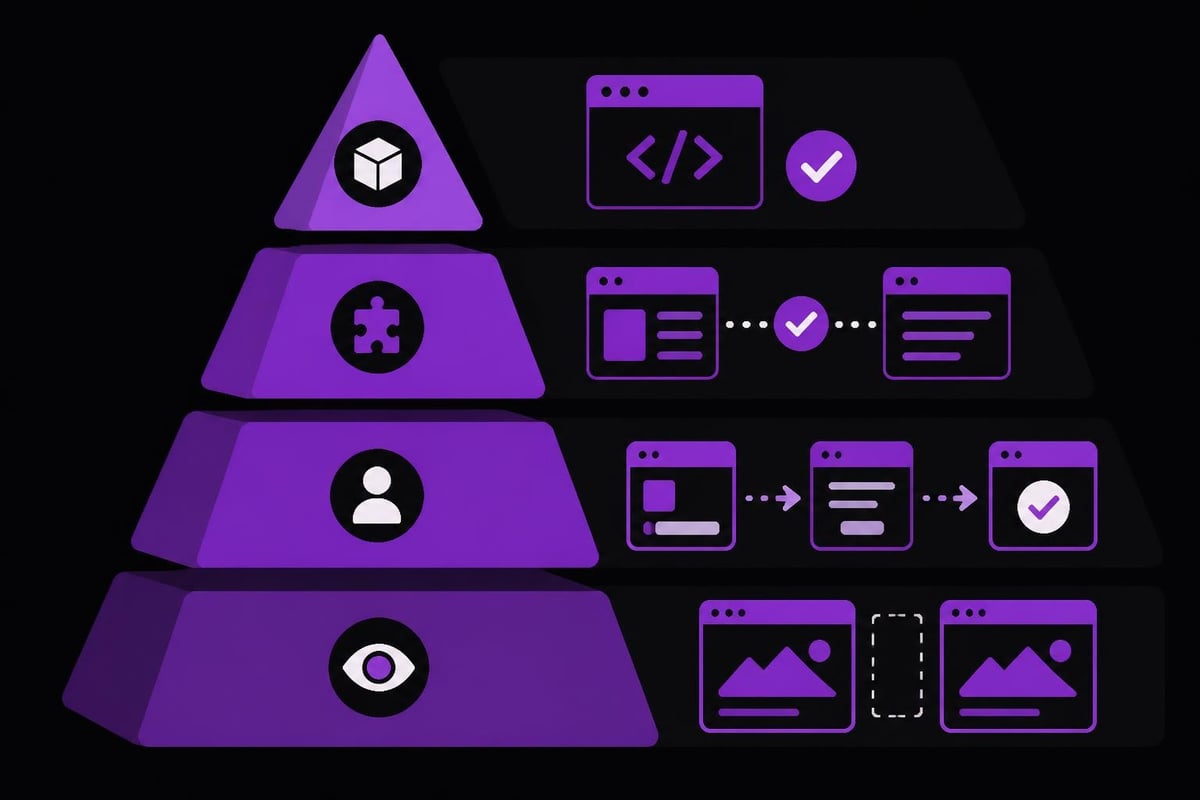
Reliable interfaces require comprehensive testing strategies spanning multiple levels. While backend services might rely heavily on unit tests, ui engineering demands integration and end-to-end testing to catch real-world issues.
Component testing validates individual interface elements in isolation. These tests verify props handling, event emissions, and rendering variations. Tools like Jest and React Testing Library enable testing component behavior without browser overhead, providing fast feedback during development.
Visual regression testing catches unintended design changes. By comparing screenshots across code changes, these tests identify when modifications inadvertently break layouts or styling. While initially time-consuming to set up, visual regression testing prevents embarrassing production issues.
Integration testing verifies how components work together within complete features. These tests interact with interfaces as users would-clicking buttons, filling forms, navigating between views. Research on UI-based flaky tests reveals common pitfalls and mitigation strategies when implementing these critical tests.
- Write tests that verify user-facing behavior, not implementation details
- Maintain accessible selectors based on roles and labels
- Test keyboard navigation and focus management
- Validate ARIA attributes and semantic structure
- Monitor performance metrics across test runs
Design System Integration
Coordinating ui engineering with design teams requires systematic processes and shared languages. The gap between design tools and code often creates friction that slows development and introduces inconsistencies. Bridging this gap represents one of ui engineering's most impactful contributions.
Modern design tools like Figma offer developer handoff features providing specifications, assets, and code snippets. However, effective ui engineering goes beyond copying values from design tools. It involves understanding design intent, questioning inconsistencies, and proposing technically optimal implementations that maintain visual fidelity.
Design tokens create single sources of truth for design decisions. Rather than hardcoding colors, spacing, or typography values, tokens abstract these decisions into named variables. When designs evolve, updating tokens cascades changes throughout the application automatically. This systematic approach aligns perfectly with web design services that prioritize maintainability.
Component Documentation Standards
Documentation bridges the gap between design, engineering, and product teams. Well-documented component libraries enable everyone to understand available interface patterns, appropriate usage contexts, and implementation requirements.
Effective component documentation includes several critical elements:
| Documentation Element | Purpose | Best Practices |
|---|---|---|
| Visual Examples | Show component variations | Include all states and sizes |
| Props Table | Define available inputs | Specify types and defaults |
| Usage Guidelines | Explain when to use | Provide context and examples |
| Code Snippets | Demonstrate implementation | Show common patterns |
| Accessibility Notes | Document a11y features | Include ARIA usage |
Framework-Agnostic Principles
While frameworks come and go, fundamental ui engineering principles remain constant. The best engineers understand these timeless concepts rather than memorizing framework-specific APIs that may become obsolete.
Separation of concerns keeps presentation logic, business logic, and data management distinct. This architectural principle makes code more maintainable, testable, and reusable. When building dashboards or complex applications, clear separation enables teams to work in parallel without conflicts.
Progressive enhancement ensures interfaces remain functional even when optimal conditions don't exist. Start with semantic HTML that works without JavaScript, then layer interactivity for capable browsers. This approach increases resilience and accessibility simultaneously.
The principle of least astonishment guides interaction design decisions. Interfaces should behave as users expect based on established conventions. Custom interactions might seem innovative, but they often frustrate users familiar with standard patterns. Following Apple's design guidelines helps maintain familiar interaction patterns.
Emerging Trends in UI Engineering
The ui engineering landscape evolves continuously as new capabilities emerge and user expectations shift. Staying current requires active learning and willingness to adopt proven techniques while skeptically evaluating hype-driven trends.
Web components offer framework-agnostic component architecture using native browser APIs. Custom elements, shadow DOM, and HTML templates enable creating reusable components that work regardless of surrounding technology. As browser support improves, web components become increasingly viable for production use.
Server-side rendering and static site generation improve initial load performance and SEO. Modern frameworks blur the lines between client and server, enabling developers to write code that renders optimally based on context. These hybrid approaches combine the benefits of traditional server rendering with rich client-side interactivity.
Artificial intelligence increasingly influences ui engineering workflows. AI-powered tools assist with layout generation, accessibility auditing, and performance optimization. However, ai engineering remains a complement to human judgment rather than a replacement. Understanding when to leverage AI automation versus manual implementation separates competent from exceptional engineers.
Cross-Platform Considerations
Products often require interfaces across web, mobile, and desktop platforms. Effective ui engineering balances code reuse with platform-specific optimization. Attempting to create truly universal interfaces often results in mediocre experiences across all platforms.
React Native enables sharing business logic while customizing interface components per platform. This approach provides 70-80% code reuse while allowing platform-specific optimizations. When building mobile apps, understanding where to share code and where to diverge determines project success.
Progressive Web Apps (PWAs) bridge web and native capabilities, offering installation, offline functionality, and push notifications through web technologies. For certain use cases, PWAs provide app-like experiences without platform-specific development overhead. However, they involve tradeoffs in capabilities and platform integration that require careful evaluation.
The decision between native, hybrid, and web approaches depends on specific requirements:
- Performance requirements and UI complexity
- Need for platform-specific features
- Development team expertise
- Maintenance resource availability
- Time-to-market constraints
Collaboration and Communication
UI engineering rarely happens in isolation. Success requires effective collaboration with designers, backend engineers, product managers, and stakeholders. Technical excellence means little if you can't communicate effectively with cross-functional teams.
Design reviews early in the development process catch issues before they become expensive to fix. Rather than waiting for complete implementations, sharing work-in-progress prototypes enables iterative refinement. This collaborative approach produces better outcomes than siloed workflows.
Understanding design rationale improves implementation quality. When engineers understand why designers made specific decisions, they can propose alternatives that achieve the same goals with better technical characteristics. This requires psychological safety to question decisions constructively without undermining expertise.
Documentation serves communication functions beyond technical reference. Architecture decision records explain why specific approaches were chosen, helping future maintainers understand context. Component guidelines help designers understand technical constraints and possibilities, fostering realistic expectations.
Mastering ui engineering principles, patterns, and practices positions teams to build exceptional digital products that users love and businesses depend on. Whether developing payment systems, gaming platforms, or AI-powered tools, the fundamentals of component architecture, performance optimization, and accessible design remain constant. Absolute Foundry specializes in building scalable interfaces across web apps, dashboards, and complex digital products, serving as your on-demand tech department while you focus on growing your market presence. Ready to elevate your product's interface engineering? Let's build something exceptional together.